Structure Webpages with HTML
-
Wireframe
1- What is Wirefram?
Wireframing is a practice used by UX designers which allows them to define and plan the information hierarchy of their design for a website, app, or product.
2- Look for Examples
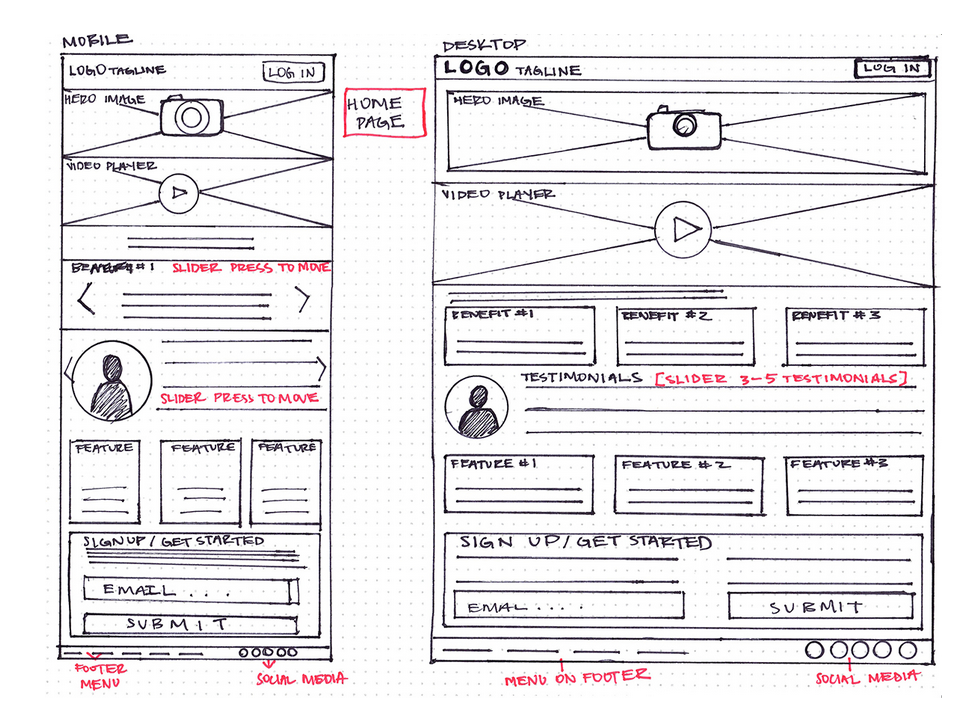
Before you start designing the wireframes of your own app or product, take a look at some examples of wireframes. This will give you some inspiration for your own wireframes.
### 3- your wireframing process
UX designers approach the task of wireframing in different ways. Some like to draw by hand, while others like to use apps or tools found online
### 4- tools for wireframing
There are heaps of free tools out there for creating wireframes and prototypes, so you should experiment with as many as you can to find the ones that suit you the best.
check this three free trials online tools:
-
How to make your wireframe in six steps
### 1- Do your research
carrying out analysis of similar product lines to your own
### 2- research for quick reference
You can imagine how much quantitative and qualitative data those various phases will produce,, so I recommend scribbling a cheatsheet with your business and user goals,use cases, and perhaps some reminders of the coolest features you stumbled across in your competitor research.
### 3- mapped out your user flow
Make sure that you have an idea of how many screens you’ll need to produce and the flow you expect the user to follow. It’s important to have a watertight concept of where your users will be coming from and where you need them to end up.
### 4- Draft & Skitch
you can finally start putting pen to paper, Remember: you’re outlining and representing features and formats, not illustrating in mighty fine detail.
pose yourself the following three questions while you’re sketching:
- How can you organise the content to support your users’ goals?
- Which information should be most prominent? Where should your main message go?
- What should the user see first when arriving at the page?
- What will the user expect to see on certain areas of the page?
- Which buttons or touch points does the user need to complete the desired actions?
5- Add some detail and get testing
add some informational details to prepare your wireframe for its upgrade, Add detail in the way you would naturally process a screen, or the page of a book: from top-to-bottom and left-to-right.
Once you’ve done all that, you’re ready for your first user tests. At this stage, your users may well be your colleagues.
6- turning your wireframes into prototypes
Once you’ve documented and acted upon the feedback from your first prototype, you can start developing your high-fidelity prototypes.
Once you’ve developed your wireframes in Sketch, you can import them into the industry-leading prototyping tool InVision and interlink your screens for a second round of high-fidelity user testing.
** for more info about wireframe go HERE**
-
Semantics
-
What Semantics mean?
In programming, Semantics refers to the meaning of a piece of code — for example “what effect does running that line of JavaScript have?”, or “what purpose or role does that HTML element have” (rather than “what does it look like?)
** for more info about Semantics go HERE**